Build a current packet and a history archive
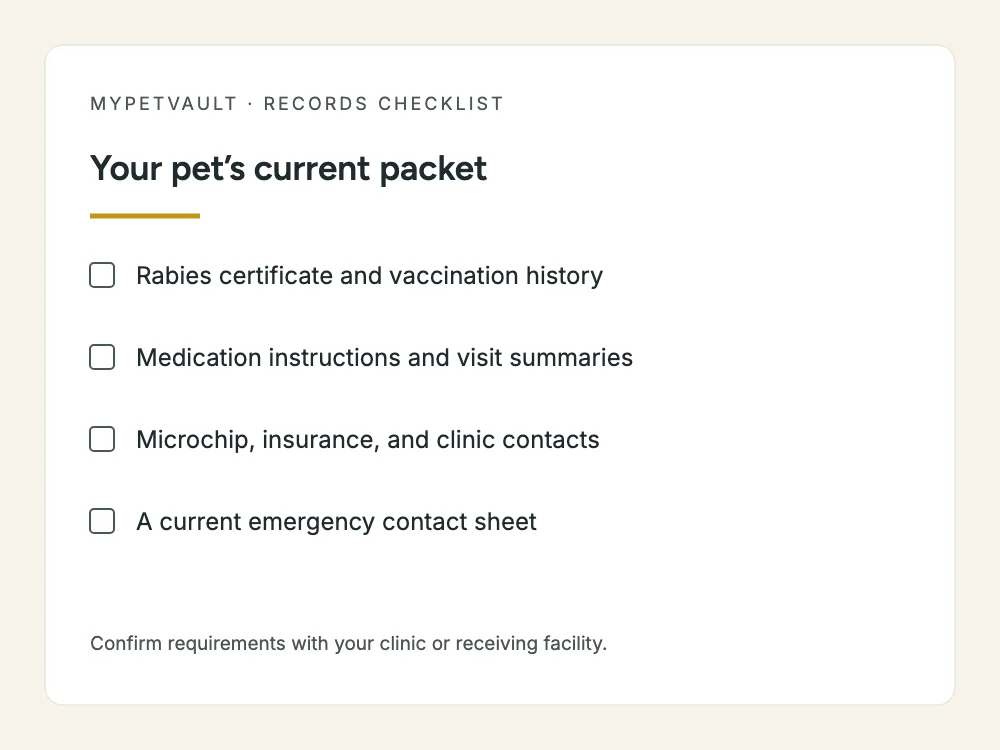
A single folder can become difficult to use when every receipt and test result has equal prominence. Separate the documents you are likely to need this month from the history you want to preserve. Your current packet might contain the latest vaccine evidence, current written medication instructions, your usual clinic’s contact information, and a short list of documents still being requested. The archive holds earlier versions and fuller clinical records.
This is a filing distinction, not a medical judgment. Do not delete a record because it seems old or because you cannot interpret it. A veterinarian can help identify what matters for an appointment. When you replace a current document, move the previous version into the archive with its date intact. Keeping the original chronology is more useful than maintaining several undated files named “latest.”
Start with these document groups
- Vaccination history and the original rabies certificate supplied by the clinic.
- Visit summaries, discharge instructions, surgery and dental records, and specialist correspondence.
- Laboratory results and imaging reports, plus instructions for obtaining original images.
- Current medication labels or written instructions and the historical prescription record.
- Microchip number, registry details, and confirmation of your contact information.
- Adoption or purchase paperwork and relevant ownership or registration documents.
- Insurance policy details, claim correspondence, and the records associated with claims.
- Primary clinic, emergency clinic, caregiver, and authorized decision-maker contacts.
Some groups need a quick reference and a supporting document. For example, a microchip number in a contact sheet is convenient, but it does not replace knowing which registry holds the registration. The AVMA explains that keeping registered contact details current helps with reunification; the microchip itself is not your pet’s complete medical file. Review the registry’s own account details instead of assuming an update in a separate app changes that registration.
Preserve the source beside the summary
A one-page summary is useful because it is short. Its weakness is that context can disappear. Keep a clear path back to the original clinic record for dates, instructions, and test results. If you type a vaccine date into a summary, retain the certificate that supplied it. If you copy a medication instruction, preserve the current label or written veterinary instruction and its date.
Do not silently resolve a conflict between documents. Mark the question and ask the clinic. A transposed date can look convincing once it appears in a neat table. Likewise, a scan that missed the bottom of a page may omit a signature or instructions. Check the entire image after saving it, including the edges, reverse side, and any continuation pages. Searchable text is helpful, but the readable original still matters.
Make a short emergency information sheet
If your pet needs urgent help, contact your veterinarian or an emergency clinic first. A records sheet is something to bring or send while arranging care, not something to complete before making that call. Keep the sheet easy for a trusted person to locate when you are unavailable. Include only current facts you can support, and leave clinical interpretation to the treating team.
Copy and adapt this template
Pet name and identifying details: Owner name and reachable phone: Backup contact and decision-maker: Primary clinic and phone: Emergency clinic and phone: Current medications and written instructions attached: Known allergies or reactions documented by the clinic: Conditions the veterinarian has told us to report: Microchip number and registry: Insurance provider and policy reference: Location of certificates and full records: Last checked on: Open questions or records still missing:
Share this sheet with the person who may actually help. Ask them to find it on their own device rather than simply confirming that they received a message. Explain where the originals live and whom to contact with questions. Keep decision-making arrangements current with the clinic and caregiver; a homemade sheet does not automatically create whatever authorization a provider may require.
Keep each pet’s history separate
A household folder is convenient, but medical files should still identify one pet clearly. Use a separate section for each animal and include the pet name in filenames. When a clinic emails a combined document, check every page before filing it. A record for another animal can otherwise travel unnoticed into the next boarding packet or appointment.
For example, “Nala-rabies-certificate-2026-06-03.pdf” tells you more than “scan-final-2.pdf.” Preserve the clinic’s original file too if you create a renamed working copy. Include the document date rather than guessing from the day you downloaded it. If the date is unclear, label that uncertainty and ask the sender instead of inventing a precise date to make sorting easier.
Decide what to share for each handoff
Your veterinarian, boarding facility, pet sitter, and insurer are solving different problems. Start with the recipient’s checklist. A complete medical transfer may be appropriate for a new clinic, while a boarding desk may only request a defined set of evidence and care instructions. Avoid attaching the whole archive automatically when a smaller packet meets the request.
Confirm the destination before sending. Verify a new email address through the organization’s established contact information, especially if it arrives unexpectedly. Open the packet yourself to check names and readability. Then ask the recipient whether it is sufficient. A successful email delivery or a visible app status is not the same as the recipient reviewing and accepting the documents.
Set an update routine you can maintain
The best filing system is one you will use after an ordinary appointment. Save the new documents while the visit is still fresh, compare the pet and date, and put unresolved questions into one note. Update the current packet only when the information changes. Move superseded copies to the archive rather than keeping several competing current versions.
- After a visit, save the summary and any written instructions.
- After a vaccination, obtain and inspect the relevant certificate or history.
- After a change in care instructions, replace the current handoff copy.
- After a move or phone change, review clinic and registry contact details.
- Before travel or boarding, ask for the recipient’s current checklist.
- Periodically, ask a trusted person to find the current packet without your help.
Choose a routine that fits your household rather than inventing a complicated maintenance calendar. The important test is practical: can someone identify the current information and find its source? A backup copy should also be readable. Try opening it occasionally, and keep sensitive documents out of a public shared folder.
Fill gaps one clinic at a time
If you are starting with scattered papers, inventory what you have before requesting duplicates. List the clinics that treated your pet and the missing document groups. Our guide to requesting pet records from a vet includes a copyable email and a receipt checklist. Collecting a clear owner copy now makes the next transition easier.
MyPetVault is a pet record app that can help organize those documents into records and keep your household working from the same collection. Smart Scan helps with the organizing step; uploading a rabies certificate is what makes the Pet Passport ready to share. Your first pet is free if you want to begin with one current packet.
Start with your first pet free
Common questions
Should I keep old records after receiving a new summary?
Keep the earlier source documents in your history archive. The short current packet can change over time, but it should not erase the chronology a veterinarian may need. Ask the receiving clinic which historical material to send.
Is a photo of a document useful?
A complete, readable photo can be a useful owner copy. Check every edge and page, preserve the original where available, and ask the recipient which document format it accepts. A photograph does not correct missing information.
Does a microchip registry hold all of my pet’s health records?
Do not assume that it does. Keep the chip number, registry name, and current registered contact information together, while maintaining medical documents separately. Check the specific registry’s features and account details directly.
What belongs in a sitter’s packet?
Start with the sitter’s needs and your veterinarian’s current written care instructions. Include contact details, the location of relevant documents, and the person to contact if you are unavailable. Avoid sharing unrelated financial or household records.
How do I know whether my records are organized well enough?
Ask someone you trust to find the current certificate, written care instructions, and clinic number without your guidance. If they can identify the pet, the current version, and the original source, the system is doing useful work.
Sources & further reading
Doing this in the app? Getting started help guide
Keep reading
 Pet Bloodwork Costs: Focused Panels and When to Discuss Yearly Testing9 min readWhen Chronic Pet Meds Cost $500–$800 a Month: How Real Owners Cut the Bill16 min read