Know which document you are looking for
A folder can contain a clinic invoice, a vaccine reminder, a vaccination history, and a rabies certificate from the same visit. They are related, but a recipient may request one specifically. Ask for the rabies vaccination certificate by name when that is the required document. Do not assume that a payment receipt or a reminder message will be accepted in its place.
A tag number can help you talk with the clinic, but a collar tag is not a readable copy of the certificate. Likewise, a microchip number identifies a chip; it should not be treated as a substitute for vaccination documentation. Keep those details available as identifiers while you locate the original record. If you are unsure which attachment is the certificate, ask the clinic rather than renaming a different document and hoping it is sufficient.
Request the certificate from the administering clinic
Start with the practice or vaccination provider that gave the vaccine. Provide your pet’s name, the owner name used at the time, and an approximate visit date if you know it. Include any former pet name or previous contact detail that will help staff match the account. Ask how the clinic can send an owner copy and whether it needs further identification.
If your pet has visited several clinics, write down which one administered the relevant vaccination before sending requests everywhere. An invoice, appointment email, or tag detail may help you identify the provider. For a broader missing history, use our guide to requesting pet records from a vet. It explains how to ask for a complete chart without confusing that request with a single certificate.
Check the copy while help is available
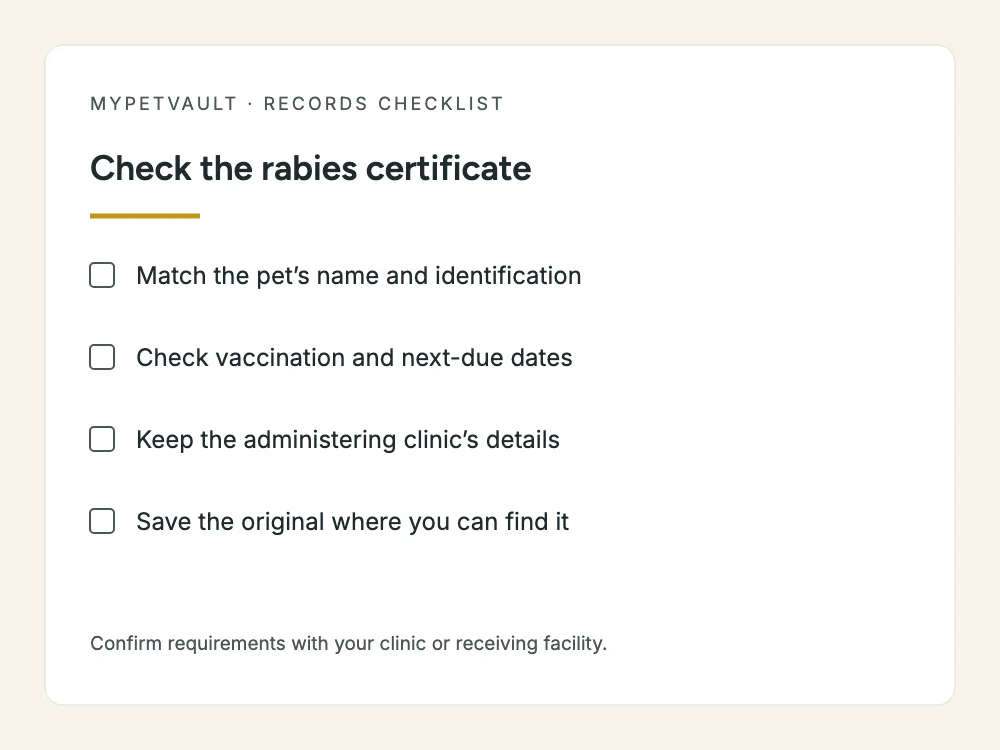
Open the certificate as soon as it arrives. Compare the pet’s identifying details with your own records and make sure all pages are present. Read the text at normal size and zoom in where needed. A file that looks fine as an email thumbnail may be blurred or cut off when someone tries to review it.
- Confirm that the document refers to your pet and the correct owner or account.
- Find the issuing clinic and veterinarian information.
- Identify the recorded vaccination date and any stated due date or period of validity.
- Check that product or lot information, where provided, is readable.
- Keep any signature, certification details, and continuation pages intact.
- Note discrepancies and ask the issuing clinic to clarify or correct them.
Use the document as issued. Do not calculate a new expiry date yourself, overwrite the animal’s name, or create an imitation certificate. If the clinic needs to correct a mistake, save the corrected version as the current copy and retain a note explaining which earlier file it replaces. If documents disagree, send the question to the clinic rather than choosing whichever date is more convenient.
Keep one current copy and a dated archive
Give the current certificate a filename that includes the pet’s name and the document date. Keep older certificates in an archive so they do not compete with the current copy in a hurried search. That structure preserves the history while making the intended handoff document obvious. Do not use only “new certificate” as a filename; it stops being descriptive after the next visit.
Keep a readable backup in a place you trust. If you use a phone photo, capture the whole sheet in good light and inspect the result before putting the paper away. Preserve the original digital attachment when available rather than repeatedly forwarding a compressed screenshot. A backup helps only if you can open it when needed, so test retrieval on the device you normally carry.
Separate organization from acceptance
Organizing a certificate makes it easier to present the evidence. It does not determine whether that evidence meets a particular facility’s or authority’s requirements. Ask the recipient exactly what it needs, provide the full relevant document, and let it review the dates and details for the intended purpose. Keep its response with the request if a deadline is involved.
For example, a boarding provider’s intake process is different from international travel documentation. The CDC maintains separate forms and instructions for dogs entering the United States under applicable import rules. An ordinary clinic certificate should not be assumed to replace every required travel form. Check the current destination and transport requirements well before making plans, and work with the veterinarian or authority responsible for that process.
Request a missing certificate before the deadline
If you can’t find the certificate, follow our lost rabies certificate replacement guide: start with the clinic that gave the shot, then follow the records trail if it has closed. Use the records-request email template when writing to the clinic. Tell the facility if you are still waiting; a tag or an unsupported date cannot stand in for the certificate.
Plan for the next document update
When the clinic supplies a replacement or a certificate after a later visit, review and file it before the message disappears down your inbox. Update any summary from the source document and keep the older copy separate. A reminder can prompt you to check the record, but it should not substitute for professional advice about when care is needed.
If your contact details change, update them directly with the clinic as well as in your personal organizer. A change in one system does not necessarily change another. If another household member handles appointments, agree who saves the certificate and where the current version lives. The practical goal is that either person can find the same document without asking who last received the email.
Give the handoff a quick retrieval test
Imagine a facility asks for the certificate while you are away from your computer. Can you locate the correct pet, open the complete document, and send it to a verified destination? Try those steps before a real deadline. If you find several competing copies, fix the naming now. If the image is unreadable, request a better copy while there is time.
For a fuller household system, see our pet-record filing checklist. MyPetVault is a pet record app that can keep the source certificate with your pet’s records. Uploading that rabies certificate is what makes the Pet Passport ready to share; a generic Smart Scan does not do that on its own. Your first pet is free if you want to start with the document you most often need to find.
Start with your first pet free
Written for pet owners in the US & Canada. Rules and fees vary by location, so confirm the details with your clinic.
Common questions
Can a rabies tag replace the certificate?
Do not assume the recipient will accept a tag. Ask for its specific evidence requirements and obtain the certificate from the administering clinic. Tag information may help you locate the right record, but it is not the full document.
What if I cannot find the clinic that gave the vaccine?
Review appointment emails, invoices, adoption paperwork, and previous records for the provider’s name. If a clinic has closed, look for a successor or records custodian. Tell your veterinarian what you have found and what remains uncertain.
Should I edit an incorrect name or date on the certificate?
No. Ask the issuing clinic to review the discrepancy and provide a corrected document if needed. Keep your original source material and explain any mismatch to the recipient while the clinic resolves it.
Does uploading any vet document make the Pet Passport ready?
No. In MyPetVault, uploading the rabies certificate makes the Pet Passport ready to share. Smart Scan helps organize documents into records, but scanning an unrelated document is not a substitute for the certificate upload.
Is a stored certificate enough for international travel?
Not necessarily. Travel can require specific forms, endorsements, timing, and other evidence. Check current official requirements for the destination and return journey, and consult the relevant veterinarian or authority before relying on an ordinary clinic certificate.
Sources & further reading
Doing this in the app? Saving records help guide
Keep reading
 Pet Bloodwork Costs: Focused Panels and When to Discuss Yearly Testing9 min readWhen Chronic Pet Meds Cost $500–$800 a Month: How Real Owners Cut the Bill16 min read