Where the bottleneck starts
In most families, one person is the pet's entire records department. They book the vet. They keep the folder, camera roll, or email thread. They know which pill is morning and which clinic has the vaccine history, because all of it lives in their head and their phone.
Look at what that one person is actually carrying. They are the appointment book and the refill reminder. They are the only one who can answer the sitter's 9 p.m. question, "has she had her pill?", because the answer is in a thread only they can see. They are the one a new vet, a boarding kennel, or an emergency clinic will call for a history they may only half remember. And when a record is missing, they are the one who has to notice, and then find an hour to chase it. None of these jobs is hard. Together, stacked on a single pair of shoulders, they are a second shift.
That works until it doesn't: a vacation, a busy month, a parent who can't drive to the clinic anymore. We wrote a companion piece about the hardest version of this, what happens to your aging parent's pet records if something happens to them, but the everyday version is quieter. Nothing is wrong. The work is just all sitting on one person, and everyone else is locked out of helping, because helping requires the folder, the login, and the knowledge of what's missing.
The fix isn't a better folder. It's letting more than one person do the work, and letting the person in charge check it.
What a "Family" is in MyPetVault
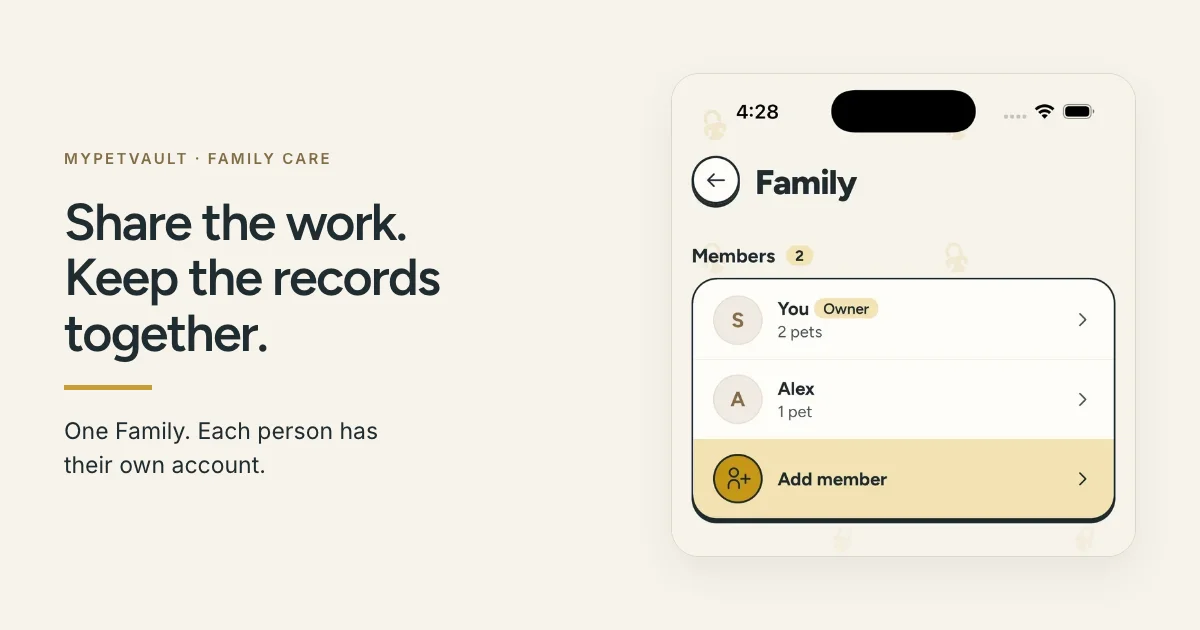
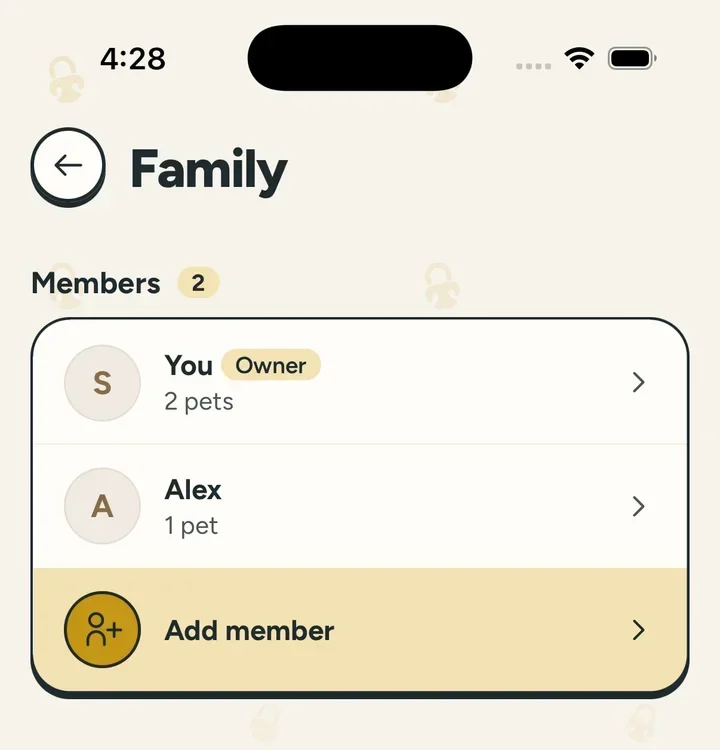
A Family is the group of people who share care of the same pets. Create one and invite the people who actually help: a spouse, an adult child, a parent, or the neighbor who feeds the cat. While sharing is active, members can see each other's shared pets with their records, documents, reminders, and Pet Passports. Creating the Family does not transfer ownership of anyone's pet profile.
A few mechanics worth knowing up front:
- A Family holds up to 6 people, including the owner.
- Members join free. Nobody you invite needs their own subscription.
- Sharing runs on the Family organizer's Plus ($4.99/month) after each new member's 7-day free sharing period with that organizer. Leaving and rejoining the same organizer's Family does not restart the week. One organizer's subscription keeps Family sharing active; it does not give every member their own Plus subscription or additional personal upload and scan allowances.
- It isn't a group chat layered over separate accounts. There is one shared record, and everyone works in it.
A pet record app becomes easier to keep current when the people doing the care can contribute to the same pet's file. Family sharing gives those helpers a place to do that.
The work, divided
Here is how the permissions work while Family sharing is active.
Anyone in the Family can:
- Open a shared family pet and see its records, documents, reminders, and Pet Passport from their own phone, in their own city. Access to someone else's pet needs a connection and current sharing access.
- Add a record when they're the one at the appointment: the vaccine given, the medication started, the weight from today's visit.
- Edit records to reflect a veterinarian's updated instructions or a correction from the issuing clinic. Keep the original document and confirm the current written directions before changing medication details.
- Upload documents to a shared pet: photograph the vaccine certificate, discharge sheet, or lab printout and save it with the pet's file. The person uploading still uses their own applicable storage and scan allowances, and any records read from the paper need review.
- Confirm medication doses as they happen. A confirmed dose can show who marked it given and when, for example "Given by Alex · 8:05 AM." That gives the next caregiver a shared handoff to check. A missing or outdated entry is a reason to contact the caregiver, not proof that a dose was missed.
The Family organizer controls:
- Invitations, approvals to join, and removal of members.
- The subscription that keeps Family sharing active. Each person's own account and billing remain separate.
The account owner of each pet controls:
- Deletion of that pet.
- Approval of files clinics send through that pet owner's upload link. Being the Family organizer does not give you approval rights over another member's pets.
And the guardrails, for everyone:
- On another person's pet, a member can delete only records or documents they themselves added. The pet's account owner has broader deletion rights. Members can still edit shared records, so discuss changes and keep original documents.
- A member cannot delete another person's pet. They remain able to manage pets owned by their own account.
- Family profiles do not expose another person's private account email or billing details. Members can see Family sharing status. Documents and care information you choose to share may themselves contain contact details.
The frequent work, including adding records, uploading papers, and confirming medication doses, can be shared. Membership stays with the organizer, and decisions about clinic uploads stay with the account owner of the relevant pet. Those can be the same person, but they do not have to be.
Getting records in is a team job, too
Most of the labor in pet records isn't storage. It's the chasing: noticing the rabies certificate in the file is the old one, calling the clinic, getting the new one sent.
In a Family, anyone can spot the gap, because anyone can look. The due date with no certificate behind it is visible to the daughter in Denver and the son across town, not just to whoever keeps the folder. When something is missing, agree who will request it. The account owner of the pet can use Email-a-Clinic: the app prepares a draft for their pets, and they choose whether to send it from their own email app. A family helper can call or email the clinic directly using the clinic's release process, then upload the documents they receive. Do not assume the helper's Email-a-Clinic form can request records for a pet owned by someone else's account. When the clinic-upload option is available and the pet owner includes a secure upload link, the clinic can reply with files or upload through that link. A new link expires after 30 days unless the pet owner disables or replaces it sooner. The clinic needs no account or app, and the link sends files in; it does not open the pet's existing records. Our step-by-step guide to requesting your pet's records from your vet covers what to ask for once you're in touch.
What happens to those files when they arrive is the pet owner's decision. Agree who holds that role before arranging a remote handoff.
And you can check their work
Sharing the work only helps if the person in charge can still trust the record. Three design choices do that:
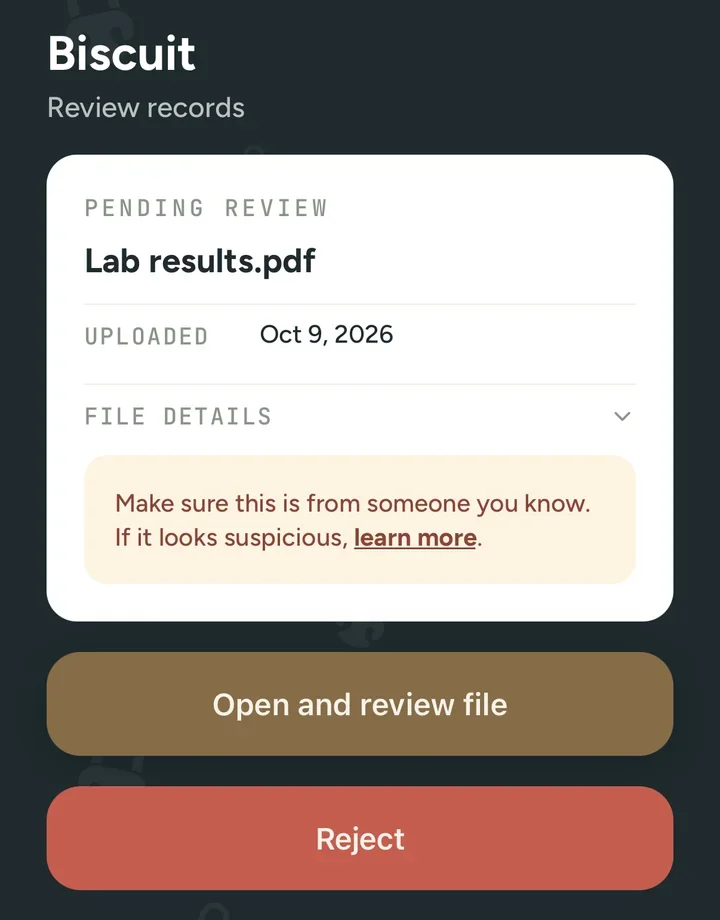
Clinic uploads wait for the pet owner's approval. When the clinic-upload option is available, files that come back through its secure link enter a review queue. The account owner of that pet opens and reviews them before accepting them into the pet's saved documents. Records read from those documents still need checking. This queue applies to clinic-link uploads; it is not a promise that every manual entry or document uploaded by a Family member waits for the organizer's approval.
Deletion rights follow the pet and the contribution. On someone else's pet, a collaborator can delete their own additions, while the pet's owner has broader rights. That reduces the chance of one helper removing another's contribution, but it does not prevent editing mistakes or make records impossible to lose. Keep original documents and talk about corrections.
Medication confirmations name the person and time. A line such as "Given by Alex · 8:05 AM" records the confirmation supplied in the app. It helps caregivers coordinate, but it cannot prove what happened away from the phone. Someone may forget to log a dose or a device may not have refreshed. If the status is unclear, contact the caregiver and follow the veterinarian's instructions rather than guessing or giving an extra dose.
That is the division of labor: the family shares the doing, and the relevant pet owner checks clinic uploads. Everyone still has a part in keeping shared entries accurate.
What this looks like on an ordinary week
Say your mom is in Tucson with her dog, and you're in Denver. With Mom's agreement, you create the dog's profile in your account and organize the Family. Mom joins, and so does the neighbor who stays with the dog when she travels. In this example, you own the dog's profile, so clinic uploads for it come to your review queue. If Mom already owns the profile in her account, she keeps that approval role; joining your Family does not move it to you.
Mom takes the dog in for a vaccine. The front desk hands her a paper certificate, and she photographs and uploads it to the shared pet. If the clinic instead uses your upload link, you review it from Denver that evening. If the vet changes a medication dose, one of you updates the record and checks the reminders against the new written instructions. When Mom travels, the neighbor gives the evening pill according to those instructions and confirms it in the app. Once the update reaches the shared view, you can check the person and time from two states away.
Then the ordinary complication arrives: Mom wants to visit you for two weeks, and the boarding kennel near your house needs the dog's vaccine history and medication list by Friday. You can start with the shared file instead of a search through drawers and messages. Check the kennel's written requirements against the documents and dates, then request anything still missing. A shared record makes that check easier; it does not guarantee the file is complete or that the kennel will accept it.
Mom's part in all of this: living her life with her dog. The records keep up anyway.
The honest limits
A Family is not magic, and it has edges worth stating plainly:
- Agree on the roles. The organizer handles membership and paid sharing; each pet's account owner reviews that pet's clinic uploads. Pick a reliable organizer and make sure the relevant pet owner can handle the review queue.
- Six people is the cap, owner included. That's a household and its helpers, not a whole extended family tree.
- Members see shared pet information. Invite people you would trust with the paper folder. Private account email and billing are not part of the Family profile, but documents you share can contain personal contact information.
- Sharing depends on the organizer's Plus after each new member's first 7-day sharing period with that organizer. Previously paid sharing has a renewal grace period; access can pause when that grace and any applicable trial have ended. Membership and each person's own pet records remain in place.
These limits help you choose who should join, who should own each pet's profile, and who will handle each handoff.
Common questions
Who can see my pet's records in a MyPetVault Family?
While sharing is active, Family members can see shared pets with their records, documents, reminders, and Pet Passports. A Family holds up to six people, including the organizer. Family profiles do not expose private account email or billing, although shared documents can contain contact information and members can see Family sharing status. Invite people you trust with the paper folder.
Can a family member delete or mess up my pet's records?
Members with active sharing access can add and edit records and upload documents. On another person's pet, they can delete only records or documents they themselves added, and they cannot delete that pet. The pet's account owner has broader deletion rights and reviews clinic-link uploads. Manual changes by members do not all wait for the organizer's approval, so keep original documents and agree how you will handle corrections.
How many people can join a Family, and what does it cost them?
Up to six people can join, including the organizer. Members join free and do not need their own subscription for Family sharing. The organizer's Plus, currently $4.99 a month, keeps sharing active after each member's first 7-day sharing period with that organizer. Leaving and rejoining the same organizer's Family does not restart the trial. Personal storage and scan allowances still apply to the person using them.
Can my family actually help get records from the vet, or can they only look?
Members can add and edit shared records, upload documents they receive, and confirm medication doses. A helper can contact the clinic through its release process. The pet's account owner can use Email-a-Clinic for their pets and include a secure upload link when that option is available. A new link expires after 30 days unless disabled or replaced sooner; clinic files wait for that pet owner's review. Do not assume a helper's Email-a-Clinic form supports a pet owned by someone else's account.
I manage my parent's dog from another state. Where do I start?
Agree who will organize the Family and which account owns the dog's profile. Invite your parent and the people who help day to day, then gather the records and request anything missing. Members can help maintain the shared file while sharing is active, but clinic-upload review belongs to the account owner of the pet. If your parent owns the existing profile, joining your Family does not transfer that review role to you.
Start with the next record, not all of them
You don't have to digitize a decade of paperwork to begin. Create the Family, invite your people, and let the next vaccine, the next visit, the next certificate land in the shared record instead of one person's inbox. The backlog gets smaller every time anyone in the family lifts a finger.
Your first pet is free. Start with your first pet free, and hand the folder to everyone.
Tommy Cao, founder of MyPetVault
Sources & further reading
Doing this in the app? Sharing & family help guide
Keep reading
 If Something Happened to Your Parent, Could You Find Their Dog's Records?9 min read
 Still Sharing a Dog After the Breakup? Keep the Care (and the Records) in One Place9 min read